
Introduction
If you’re looking for one platform to build sales funnels, send emails, sell courses, manage affiliates, and automate your online business without juggling multiple tools, Systeme.io has probably already caught your attention.
I started testing Systeme.io while building funnels and email automation workflows for AIToolsFuel. My main goal was simple: could it realistically replace separate tools like funnel builders, email marketing software, affiliate systems, and basic course platforms—without increasing cost or complexity?
In this systeme io review, I’ll share what actually works well, where the platform feels limited, and who should (and shouldn’t) use Systeme.io. This is not a hype-based review—you’ll find honest pros and cons, pricing insights, real use cases, and practical comparisons to help you decide if Systeme.io is the right fit for your business.
👉 Try the Systeme.io Free Plan (No credit card required)
Systeme.io Overview
Systeme.io brings website building, sales funnels, email automation, online courses, webinars, and community features together into a single platform. It’s designed for people who want a simple, affordable setup without relying on multiple integrations or plugins.
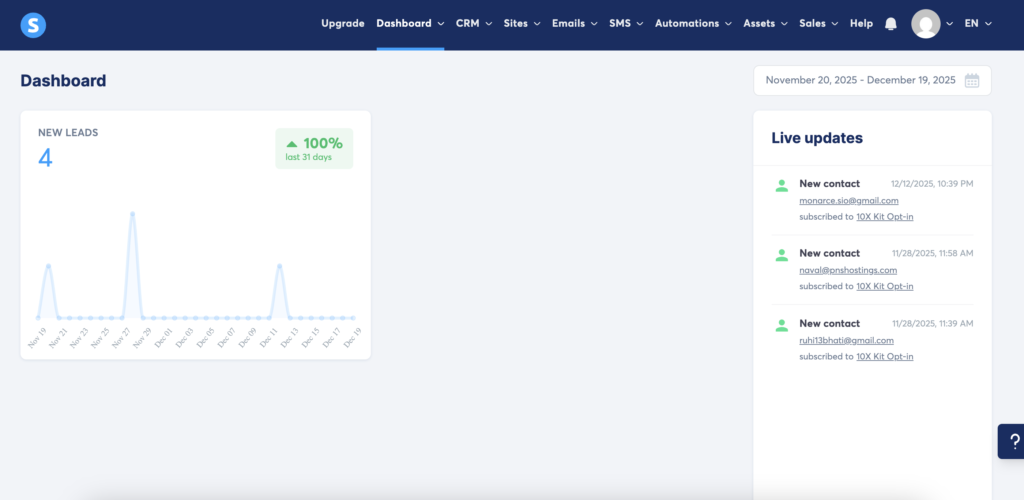
Instead of connecting several tools, you manage everything from one dashboard—using drag-and-drop builders, automation rules, and built-in membership management. The focus here is clearly on ease of use and predictable pricing rather than advanced enterprise complexity.
Core Features
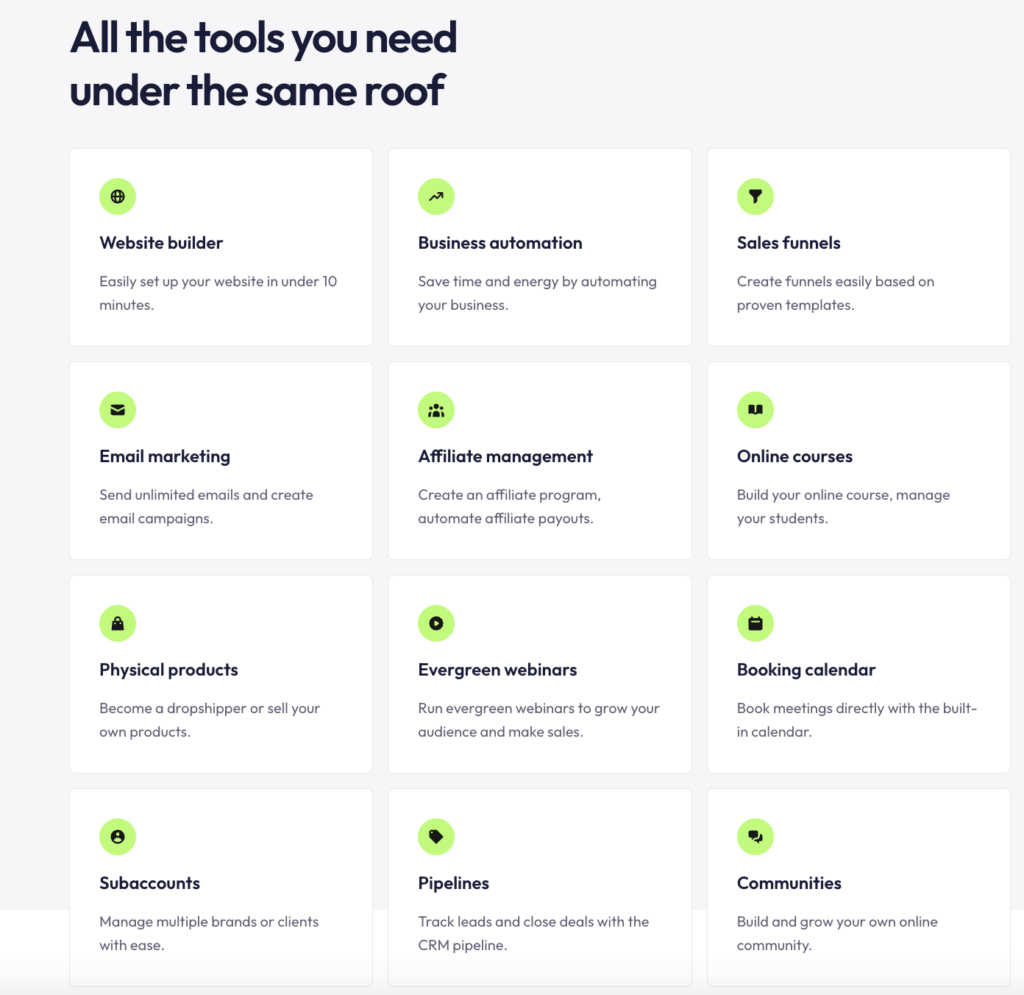
- Funnel and web page builder: Drag-and-drop editor for landing pages, opt-in forms, sales pages, and checkout pages. Templates help you launch faster, and you can easily add order bumps and one-click upsells to increase average order value.
- Email marketing and automation: Create broadcast emails and automated sequences with tags, rules, and workflows. You can segment subscribers, trigger emails based on behavior, and automatically grant access to courses or funnels.
- Online courses and memberships: Host lessons, drip content, and restrict content by plan. You can create student dashboards, track progress, and bundle courses with upsells.
- Affiliate program management: Built-in affiliate tracking, commission settings, and promo materials so you can recruit and manage affiliates without third-party tools.
- Evergreen webinars: Run evergreen webinars to grow your audience and make sales.
- Physical products: Become a drop-shipper or sell your own products.
- Payments and integrations: Native Stripe and PayPal support for one-time and recurring billing. Zapier or native webhooks cover other apps when needed.
- Additional tools: Blogging, coupons, A/B testing (on some plans), and basic CRM features for contact management.
How Systeme io Works
Systeme.io works by letting you build all your assets—funnels, emails, products, and automations—inside one account and then connect them using simple rules.
For example, you can create a funnel, attach an email sequence, connect a checkout page, and automatically enroll buyers into a course. When someone opts in or makes a purchase, Systeme.io can send emails, apply tags, unlock content, and redirect users without any extra tools.
Payments are handled through Stripe or PayPal, and affiliates get unique tracking links that credit commissions automatically. Everything—from leads to sales to course access—is managed from a single dashboard.
Target Audience
Who Systeme.io Is Best For (And Who Should Avoid It) – Systeme.io works best for creators and small businesses that want simplicity, predictable pricing, and an all-in-one workflow. Based on real usage, here’s a clear breakdown:
- Best for: Beginners, affiliate marketers, course creators, coaches, solopreneurs, and small online businesses.
- Good fit if: You want funnels, email automation, and digital product sales in one platform without high monthly costs
If your priority is speed, affordability, and fewer moving parts, Systeme.io delivers strong value. However, if you already rely on advanced CRM systems, deep segmentation, or pixel-perfect page design, the platform may feel restrictive.
Who should avoid Systeme.io: Large enterprises, advanced designers, or teams needing complex CRM systems or deep third-party integrations.
In those cases, you may want to explore more advanced or specialized alternatives.
Ease of Use
Systeme.io focuses on simplicity: you’ll find guided setup steps, a drag-and-drop funnel builder, and centralized account menus for funnels, emails, and products. Expect clear labels, templates, and fast customer support to reduce setup friction.
Real Use Cases: How Systeme.io Performs in Practice
I used Systeme.io to build lead-capture funnels, connect email automation, and test product checkout flows. Setting up opt-in funnels and automated email sequences was straightforward, and most workflows worked smoothly without external tools.
For small affiliate campaigns and lead magnets, Systeme.io handled funnel pages, email delivery, and automation reliably. That said, for advanced design customization and complex segmentation, the platform felt more limited compared to enterprise-level tools.
Onboarding Process
The onboarding sequence walks you through domain connection, payment setup, and your first funnel with step-by-step prompts. You get a checklist-style setup area that marks completed tasks and links to short help articles, so you can track progress without guessing what’s next.
If you prefer guided help, live chat and email support respond quickly according to multiple user reports, which shortens delays when you hit technical snags. Prebuilt funnel and course templates let you launch basic funnels in under an hour if you follow the checklist.
User Interface Design
The dashboard groups Funnels, Emails, Courses, and Contacts into top-level tabs, so you access core tools with one click. Navigation labels are literal (e.g., “Funnels,” “Automation”), reducing time spent hunting for features.
The funnel and email editors use visual blocks and drag-and-drop placement. Editors aren’t as feature-dense as enterprise tools, which keeps screens uncluttered but limits ultra-custom layout control. Button labels, form fields, and template previews display clearly, helping you make quick choices.
Learning Curve
You’ll pick up basic tasks—creating a funnel, connecting payments, sending an email—within a few hours thanks to templates and inline help. If you need advanced automations or custom code, expect a longer ramp-up; those areas require reading docs and testing flows.
Systeme.io bundles video tutorials and knowledge-base articles that match common use cases, which speeds learning for typical entrepreneur workflows. Complex integrations or conditional automations demand trial-and-error, so plan extra time for testing before publishing live campaigns.
Sales Funnel Functionality
Systeme.io centralizes funnel creation, page templates, and basic optimization tools so you can build and refine multi-step sales processes without stitching multiple services together. Expect a drag-and-drop editor, prebuilt funnel types, and simple A/B testing aimed at direct-response marketing and course/product launches.
Funnel Builder
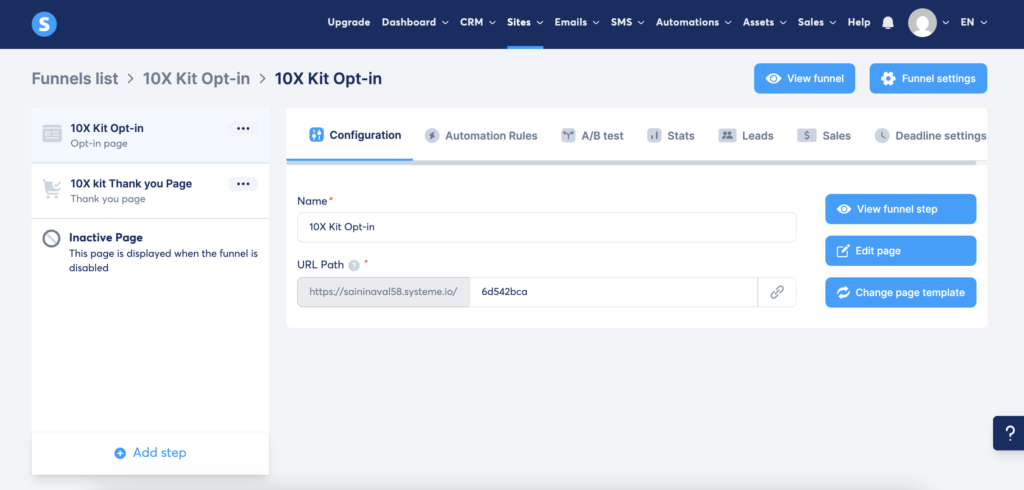
The funnel builder uses a visual, drag-and-drop editor that lets you assemble multi-step funnels (opt-in → sales → upsell/downsells → thank-you) in a single flow. You can create pages, configure product offers, set pricing options, and attach autoresponder sequences from the same interface.
Pages support custom blocks (text, images, forms, countdown timers, testimonials) and you can edit HTML/CSS for advanced tweaks. You link order forms to payment connectors (Stripe, PayPal), set one-click upsells, and enable affiliate tracking per product. The interface prioritizes speed and clarity over advanced animation or deep design control, which helps you build functional funnels quickly.
Templates Available
Systeme.io includes a library of templates grouped by funnel goal: lead generation, product launch, webinar, and course sales. Templates come pre-populated with copy blocks, form integrations, and suggested funnel steps so you can deploy a funnel in minutes.
Templates vary in complexity from single-page lead magnets to multi-step launch sequences. You can filter by conversion type, clone templates, and save custom templates for reuse. Design variety is adequate for most small businesses, though agencies or high-end brands may find the styling options limited without custom CSS.
Split Testing
Systeme.io offers built-in A/B (split) testing for pages inside a funnel to compare headlines, layouts, or offers. You create variants, set traffic allocation, and track metrics like conversion rate and revenue without exporting data.
Testing focuses on individual page performance rather than entire funnel-wide experiments. Reports show visit counts, conversions, and basic statistical outcomes so you can pick the winning variant. For complex multi-variant or sequential testing across several funnel steps, you may need more advanced tools, but Systeme.io covers the essentials for iterative optimization.
Email Marketing Tools
Systeme.io gives you the tools to build automated sequences, segment lists, and measure campaign performance without juggling multiple apps. Expect visual workflows, tag-based segmentation, and basic analytics tailored to common small-business needs.
Automation Features
You create visual automation funnels with a drag-and-drop editor that links triggers (form opt-in, purchase, tag added) to actions (send email, apply tag, wait, add to funnel). You can build welcome sequences, cart-abandonment flows, and post-purchase follow-ups that run without manual intervention.
Conditional steps let you branch based on subscriber behavior — for example, send a follow-up only if a link isn’t clicked within X days. Automation supports delays, recurring emails, and integration points for payments and membership access, so you can connect email flows to product delivery and affiliate tracking.
Templates and prebuilt workflows shorten setup time. You’ll still want to test each path and monitor deliverability, since advanced throttling and ISP-specific controls are limited compared with dedicated ESPs.
List Management
Systeme.io uses lists and tags to organize contacts; tags are the primary tool for granular segmentation. You can assign tags via forms, automations, purchases, or manually, enabling behavior-based groups like “course-student” or “trial-cancelled.”
Forms and funnels capture subscribers with customizable fields. You can store custom field values (location, product interest) and use them for personalization in emails. Import/export options let you move CSV contact lists in and out when needed.
Duplicate handling and subscription status (active, unsubscribed, bounced) appear in contact records. For complex CRM-style relationships or advanced lead scoring, you may find the native list tools basic, but they cover most solo-entrepreneur workflows effectively.
Campaign Analytics
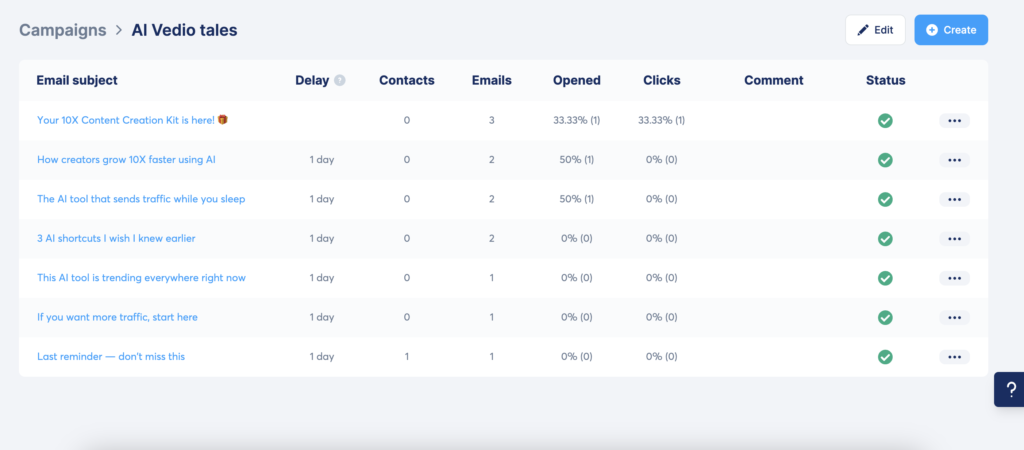
Systeme.io provides campaign-level metrics such as open rate, click-through rate, unsubscribe rate, and bounce counts for broadcasts and sequences. You can view these stats per email, which helps you spot low-performing subject lines or links quickly.
Funnel-level conversion metrics connect email performance to sales, showing which messages drove purchases or sign-ups. Reporting lacks advanced attribution windows and cohort analysis, but the core KPIs for testing subject lines, timing, and calls to action are easy to access.
Exportable reports let you pull raw metrics for deeper analysis in spreadsheets. Use A/B subject testing and watch the per-email stats to iterate; that approach compensates for the absence of enterprise-grade analytics.
Online Course and Membership Management
Systeme.io gives you the tools to build courses, protect content, and manage members and payments from one dashboard. Expect a course builder, enrollment controls, drip scheduling, member access tiers, and integrated payment handling that work together without third‑party stitching.
Course Creation
You build courses using a visual course editor that accepts lessons, modules, and downloadable files. Drag-and-drop lesson ordering speeds up setup, and you can upload videos (MP4), PDFs, and audio files directly or embed hosted video links.
Pricing and access attach to individual courses or bundles. Set one-time payments, subscriptions, or payment plans; connect Stripe and PayPal for checkout. You can also create coupons and limited-time offers within the same product configuration.
You get basic student tracking: lesson completion checks and simple progress indicators. There’s no advanced LMS reporting like detailed quiz analytics, but the essentials—lesson sequencing, variety of content types, and payment options—cover most creator needs.
Membership Site Tools
Membership areas let you group multiple courses or resources under tiered access. Create unlimited membership levels (depending on plan), assign different content to each level, and manage enrollments from a members list.
Access control includes manual enrollment, purchase-based enrollment, and drip-release rules. You can protect pages and funnels so only active members view them, and automate cancellations or renewals based on payment status.
Affiliate management integrates with memberships so you can pay partners for referrals automatically. You also get basic community features like comment-enabled lessons and messaging, but you won’t find a full-feature social forum built in.
Content Delivery
Content delivery supports immediate access and time-released (drip) schedules. Drip scheduling can release lessons on a date or a set number of days after enrollment, which helps structure cohorts or evergreen funnels.
Video hosting depends on your storage and plan; you can embed third-party players to avoid bandwidth limits. The platform serves course pages and member dashboards with responsive templates so content displays on mobile and desktop without extra work.
You can bundle downloads, track downloads per student, and restrict access after a set period. For high-volume streaming or advanced analytics, consider an external video host, but for most creators the built-in delivery tools are sufficient.
Pricing and Plans
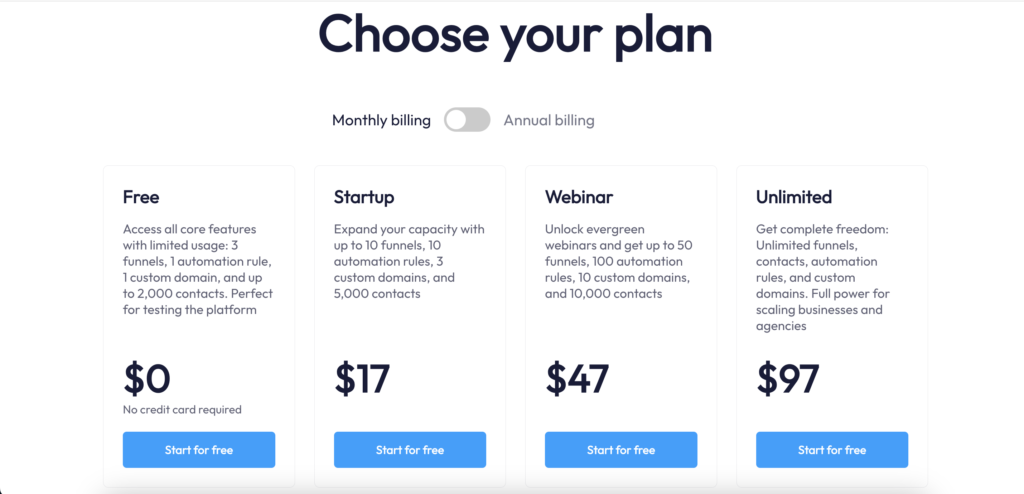
Systeme.io offers a tiered pricing structure from a free plan up to an Unlimited plan, with different caps on contacts, funnels, automations, and webinars. You’ll find monthly and annual billing (annual saves), and higher tiers unlock more funnels, unlimited contacts, and webinar features.
For most beginners and solopreneurs, starting with the free plan is enough to validate an idea before committing to a paid tier.
👉 Start with Systeme.io Free Plan (No Credit Card Needed)
Plan Comparison
Systeme.io uses four main plans: Free, Startup, Webinar, and Unlimited. Prices in 2025 range roughly from $0 to about $97/month depending on billing frequency and promotions. Each plan increases limits on contacts, the number of funnels/pages, and features like automation rules and membership sites.
Key differences to check:
- Contact limits and whether contacts are unlimited.
- Number of funnels, email sends, and automation workflows.
- Webinar support (only on Webinar and Unlimited tiers).
- Team/multiple-user access and affiliate program management.
Compare plans by need:
- If you’re testing an offer, the Free plan covers basic funnels and email sequences.
- If you run paid launches or webinars, choose Webinar or Unlimited for live/automated webinar hosting and higher limits.
- If you scale email volume and memberships, Unlimited removes most caps.
If you’re deciding between different Systeme.io plans here our detailed description for all plans.
Free Plan Features
The Free plan covers the essentials to start: funnel and page builder, basic email marketing, and selling digital products. You can manage up to 2,000 contacts on the free tier, create funnels, set up autoresponders, and host basic affiliate programs.
Limitations to note:
- Caps on funnels/pages and automation complexity compared with paid tiers.
- No webinar hosting and reduced customer support priority.
- Limits on the number of sales funnels and membership site functionality.
Use the Free plan to validate product-market fit, collect leads, and run low-volume email campaigns. If you hit caps for contacts, funnels, or webinars, upgrade to Startup or Webinar depending on the feature you need.
Value for Money
Systeme.io generally positions itself as cost-competitive versus platforms like ClickFunnels, offering many core features at lower price points. You pay for specific capabilities: webinar hosting, unlimited contacts, and advanced automation are the main drivers of higher-tier pricing.
Assess value by your use case:
- For solo creators selling courses and small-ticket products, Startup often delivers strong ROI.
- For webinar-based launches, Webinar plan reduces the need for third-party webinar tools.
- For agencies or fast-growing businesses, Unlimited avoids frequent upgrades by removing major caps.
Check annual billing discounts and limits on email sends or automation tasks when calculating real cost.
Systeme.io Pros and Cons (Honest Take)
What I Like About Systeme.io
- True all-in-one platform: Funnels, email marketing, courses, memberships, and affiliate management work together without external plugins.
- Affordable pricing: Compared to tools like ClickFunnels or Kajabi, Systeme.io offers similar core features at a much lower cost.
- Beginner-friendly: The interface is clean, and most basic funnels can be launched within a few hours.
- Free plan available: You can test funnels, email sequences, and selling digital products without entering a credit card.
Where Systeme.io Falls Short
- Limited design flexibility: If you want pixel-perfect layouts or advanced animations, you may feel restricted.
- Email marketing is basic: It covers essential automation but lacks advanced deliverability controls found in dedicated ESPs.
- Not built for large teams: Multi-user roles and enterprise workflows are limited.
Systeme.io vs Other Popular Platforms (Quick Overview)
Systeme.io is often compared with platforms like ClickFunnels, GetResponse, and Kajabi. In short:
- Systeme.io vs ClickFunnels: Systeme.io is significantly cheaper and easier for beginners, while ClickFunnels offers more advanced design control.
- Systeme.io vs GetResponse: GetResponse is stronger for advanced email marketing, but Systeme.io wins as an all-in-one business platform.
- Systeme.io vs Kajabi: Kajabi excels at premium course experiences, while Systeme.io is better for affordability and funnels.
I’ve covered full comparisons separately to keep this review focused.
Systeme.io FAQ
Is Systeme.io free?
Yes. Systeme.io offers a free plan that includes basic funnels, email marketing, and digital product selling.
Is Systeme.io legit?
Yes. Systeme.io is a widely used platform with thousands of users globally.
Is Systeme.io good for affiliate marketing?
Yes. It includes built-in affiliate management and works well for affiliate funnels.
What are the best Systeme.io alternatives?
Popular alternatives include ClickFunnels, GetResponse, Kajabi, and GoHighLevel.
Final Verdict
👉 Try Systeme.io Free and See If It Fits Your Workflow
Is Systeme.io Worth It in 2025?
Systeme.io is a practical choice if you want to build funnels, automate email marketing, sell courses, and manage affiliates without paying for multiple tools.
It’s especially well-suited for beginners, solopreneurs, affiliate marketers, and course creators who value simplicity and predictable pricing. While it doesn’t offer the deep customization or analytics of enterprise platforms, it covers the essentials extremely well.
Bottom line: If ease of use and cost-effectiveness matter more to you than advanced customization, Systeme.io is absolutely worth trying.
👉 Recommendation: Start with the Systeme.io Free Plan and upgrade only when you actually hit the limits.
About the Author
Naval Saini is the founder of AIToolsFuel, where he reviews all-in-one marketing platforms, AI tools, and automation software for creators and small businesses. His content focuses on practical, real-world testing to help beginners choose the right tools, understand pricing, and build sustainable online businesses without hype.